Documentation Index
Fetch the complete documentation index at: https://docs.pandryx.com/llms.txt
Use this file to discover all available pages before exploring further.
Installation
- Unzip Pandryx_Notify and place Pandryx_Notify in your server’s resources folder.
- Add ensure Pandryx_Notify to your server.cfg
- Make sure it starts before any resource that depends on it
- Start / Restart your server
Resource Structure
notify/
├── client/
│ └── main.lua
├── server/
│ └── main.lua
├── ui/
│ └── html/
│ ├── index.html
│ ├── assets/
│ │ ├── index-[hash].js
│ │ └── index-[hash].css
│ └── sounds/
│ └── sound.wav
├── config.lua
└── fxmanifest.lua
Configuration
config.lua contains the default fallback values used when a parameter is not explicitly passed by the caller.
Config.Default = {
-- Content
type = "success",
title = "Notification",
message = "",
icon = nil,
-- Behaviour
duration = 5000,
position = "bottom-right",
important = false,
-- Features
progress = true,
sound = false,
confetti = false,
stacking = true,
-- Actions
actions = {},
}
Any key you do not pass in a notification call will fall back to the value above. Explicit values — including false, 0, and "" — are always respected and will never be overwritten by a default.
Notification Fields
| Field | Type | Description | |
|---|
type | string | Notification style. See types below | |
title | string | Bold heading text | |
message | string | Body text. Can be empty | |
icon | `string | nil` | Emoji override e.g. "🛡️". nil uses the type default |
duration | number | Auto-dismiss time in ms. 0 = persistent | |
position | string | Screen anchor. See positions below | |
important | boolean | Pins to front of stack. No auto-dismiss | |
progress | boolean | Show countdown progress bar | |
sound | `string | boolean` | Filename from html/sounds/ e.g. "pop.wav". false = silent |
confetti | boolean | Burst of confetti on mount | |
stacking | boolean | true = deck mode, false = list/column mode | |
actions | table | Array of action button objects. See actions below | |
Notification Types
| Type | Layout | Notes |
|---|
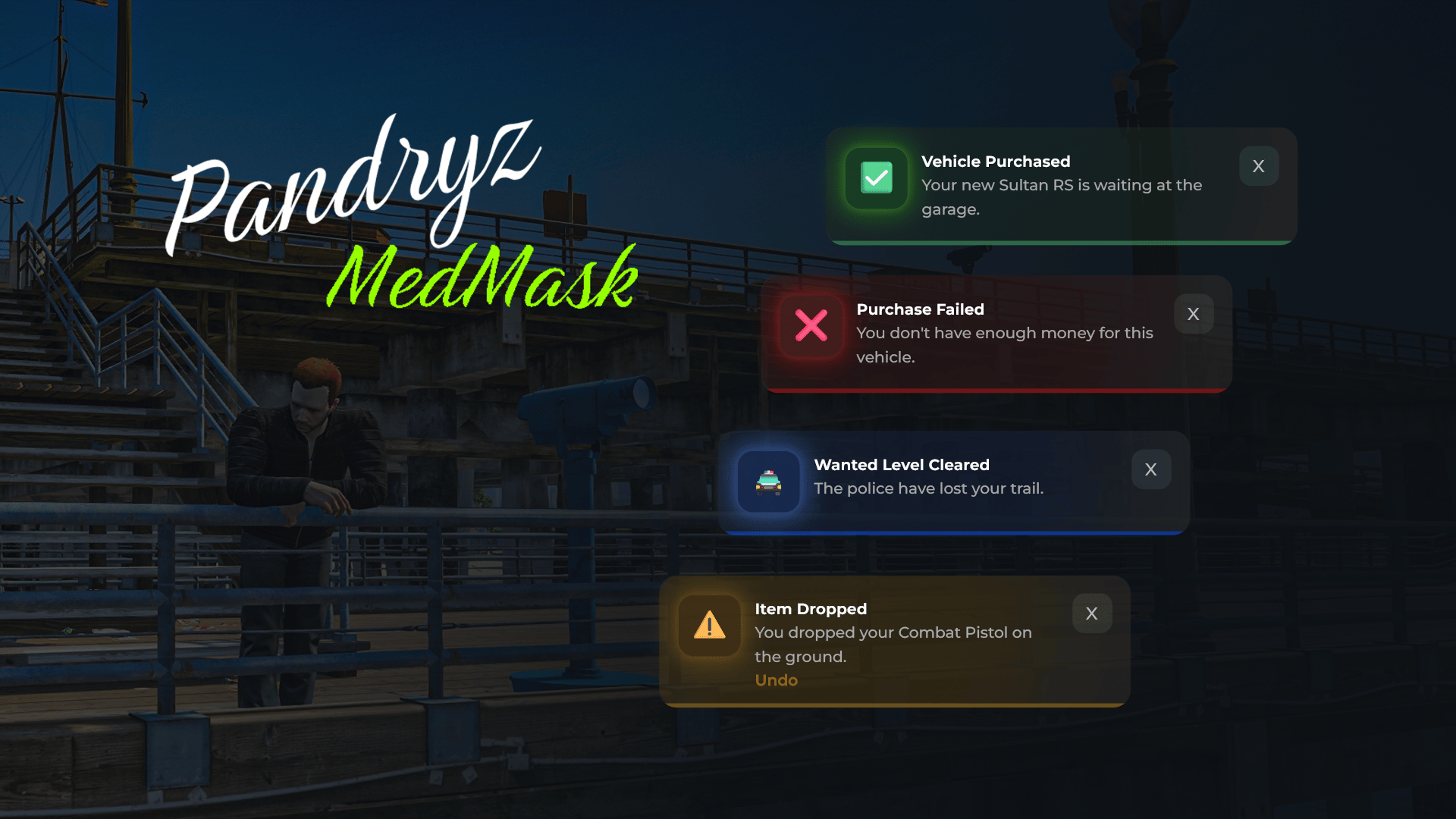
"success" | Toast | Green accent |
"error" | Toast | Red accent |
"warning" | Toast | Amber accent |
"info" | Toast | Blue accent |
"celebration" | Centred, large icon | Pair with confetti = true |
"confirm" | Dialog, centred | Pair with duration = 0 and actions |
Positions
| Value | Location |
|---|
"top-left" | Top left corner |
"top-center" | Top center |
"top-right" | Top right corner |
"bottom-left" | Bottom left corner |
"bottom-center" | Bottom center |
"bottom-right" | Bottom right corner |
Actions
Action buttons appear on toast and confirm layouts. Each action is a table with the following fields:
| Field | Type | Description | |
|---|
label | string | Button text | |
style | string | "primary", "secondary", or "ghost" | |
event | string | Event name to fire e.g. "myScript:onAccept" | |
eventType | string | "client" or "server". Defaults to "client" | |
data | `table | nil` | Optional data passed to the receiving event handler |
When a player clicks an action button, notify fires either TriggerEvent or TriggerServerEvent depending on eventType. The receiving event handler is registered in your own resource, not in notify.
Action Button Styles
| Style | Appearance | Typical Use |
|---|
"primary" | Accent coloured, glowing border | Main confirm action |
"secondary" | Subtle border, muted text | Reject or cancel action |
"ghost" | Text only, inline with message | Lightweight undo-style action |
Sounds
Place any .wav, .mp3, or .ogg file inside html/sounds/ and reference it by filename:
Any file dropped into that folder is automatically served — no manifest changes needed. Set sound = false or omit the field entirely for a silent notification.
Stacking Modes
| Mode | Field | Behaviour |
|---|
| Deck | stacking = true | Notifications stack on top of each other. Older ones peek behind |
| List | stacking = false | Notifications appear as a vertical column |
The position updates globally whenever a new notification arrives with a position or stacking field. This lets you change the layout between calls.
Important Notifications
Setting important = true pins the notification to the front of the stack and disables auto-dismiss. The player must manually close it.
exports["Pandryx_Notify"]:SendNotification({
type = "error",
title = "Server Saving...",
message = "Please do not disconnect.",
duration = 0,
important = true,
position = "top-center",
})
Queue Behaviour
A maximum of 5 notifications are shown on screen at once. Any additional notifications are queued and promoted automatically as older ones are dismissed.
API Reference
Client-Side Export
exports["Pandryx_Notify"]:SendNotification(data)
exports["Pandryx_Notify"]:ClearNotifications()
Client-Side Event
TriggerEvent('Pandryx_Notify:client:sendNotification', data)
TriggerEvent('Pandryx_Notify:client:clearNotifications')
Server-Side Export
exports["Pandryx_Notify"]:SendNotification(playerId, data)
exports["Pandryx_Notify"]:ClearNotifications(playerId)
Pass -1 as playerId to broadcast to all connected players.
Server-Side Event
TriggerEvent('Pandryx_Notify:server:sendNotification', playerId, data)
TriggerEvent('Pandryx_Notify:server:clearNotifications', playerId)
Usage Examples
Client-Side — via Export
Success (with sound)
exports["Pandryx_Notify"]:SendNotification({
type = "success",
title = "Vehicle Purchased",
message = "Your new Sultan RS is waiting at the garage.",
duration = 5000,
progress = true,
sound = "pop.wav",
position = "bottom-right",
})
Error
exports["Pandryx_Notify"]:SendNotification({
type = "error",
title = "Purchase Failed",
message = "You don't have enough money for this vehicle.",
duration = 6000,
progress = true,
position = "bottom-right",
})
Warning (with ghost action button)
exports["Pandryx_Notify"]:SendNotification({
type = "warning",
title = "Item Dropped",
message = "You dropped your Combat Pistol on the ground.",
duration = 7000,
progress = true,
position = "bottom-right",
actions = {
{
label = "Undo",
style = "ghost",
event = "myScript:undoDrop",
eventType = "client",
},
},
})
Info (stacking disabled — list mode)
exports["Pandryx_Notify"]:SendNotification({
type = "info",
title = "New Message",
message = "You have 3 unread messages.",
duration = 4000,
progress = false,
stacking = false,
position = "top-right",
})
Info (with custom icon override)
exports["Pandryx_Notify"]:SendNotification({
type = "info",
title = "Wanted Level Cleared",
message = "The police have lost your trail.",
duration = 5000,
progress = true,
icon = "🚔",
position = "top-center",
})
Celebration (with confetti and sound)
exports["Pandryx_Notify"]:SendNotification({
type = "celebration",
title = "You levelled up!",
duration = 6000,
progress = true,
confetti = true,
sound = "pop.wav",
position = "bottom-center",
})
Confirm Dialog — client action (no data)
exports["Pandryx_Notify"]:SendNotification({
type = "confirm",
title = "Delete Character?",
message = "This action is permanent and cannot be undone.",
duration = 0,
progress = false,
position = "bottom-center",
actions = {
{
label = "Cancel",
style = "secondary",
event = "myScript:cancelDelete",
eventType = "client",
},
{
label = "Delete",
style = "primary",
event = "myScript:confirmDelete",
eventType = "client",
},
},
})
Confirm Dialog — server action (with data)
exports["Pandryx_Notify"]:SendNotification({
type = "confirm",
title = "Job Offer",
message = "BigSmoke is offering you a delivery for \$1,200.",
duration = 0,
progress = false,
position = "bottom-center",
actions = {
{
label = "Decline",
style = "secondary",
event = "jobScript:onDecline",
eventType = "server",
data = { jobId = 14 },
},
{
label = "Accept",
style = "primary",
event = "jobScript:onAccept",
eventType = "server",
data = { jobId = 14, reward = 1200 },
},
},
})
Important — Pinned (no auto-dismiss)
exports["Pandryx_Notify"]:SendNotification({
type = "error",
title = "Server Saving...",
message = "Please do not disconnect. This will take a moment.",
duration = 0,
progress = false,
important = true,
position = "top-center",
})
Stacking enabled — deck mode
exports["Pandryx_Notify"]:SendNotification({
type = "info",
title = "Stacking On",
message = "Notifications will now stack as a deck.",
duration = 3000,
progress = false,
stacking = true,
position = "bottom-right",
})
Stacking disabled — list mode
exports["Pandryx_Notify"]:SendNotification({
type = "info",
title = "Stacking Off",
message = "Notifications will now appear as a list.",
duration = 3000,
progress = false,
stacking = false,
position = "bottom-right",
})
Clear all notifications
exports["Pandryx_Notify"]:ClearNotifications()
Client-Side — via Event
-- Send a notification
TriggerEvent('Pandryx_Notify:client:sendNotification', {
type = "success",
title = "Clocked In",
message = "Your shift has started. Good luck!",
duration = 5000,
progress = true,
sound = "pop.wav",
})
-- Clear all
TriggerEvent('Pandryx_Notify:client:clearNotifications')
Server-Side — via Export
Notify a specific player
exports["Pandryx_Notify"]:SendNotification(source, {
type = "success",
title = "Payday!",
message = "You received your weekly salary of \$3,500.",
duration = 6000,
progress = true,
sound = "pop.wav",
position = "bottom-right",
})
Broadcast to all players
exports["Pandryx_Notify"]:SendNotification(-1, {
type = "warning",
title = "Server Restart",
message = "The server will restart in 5 minutes. Please find a safe location.",
duration = 10000,
progress = true,
position = "top-center",
sound = "pop.wav",
})
Celebration broadcast — confetti for everyone
exports["Pandryx_Notify"]:SendNotification(-1, {
type = "celebration",
title = "Event Winner!",
duration = 7000,
progress = true,
confetti = true,
sound = "pop.wav",
position = "bottom-center",
})
Clear a specific player
exports["Pandryx_Notify"]:ClearNotifications(source)
Clear all players
exports["Pandryx_Notify"]:ClearNotifications(-1)
Server-Side — via Event
-- Notify a specific player
TriggerEvent('Pandryx_Notify:server:sendNotification', source, {
type = "error",
title = "Kicked from Job",
message = "You were removed from the delivery team.",
duration = 7000,
progress = true,
position = "bottom-right",
})
-- Broadcast to all players
TriggerEvent('Pandryx_Notify:server:sendNotification', -1, {
type = "info",
title = "New Event Started",
message = "A race event has begun at the docks. /join to enter.",
duration = 8000,
progress = true,
sound = "pop.wav",
position = "top-center",
})
-- Clear a specific player
TriggerEvent('Pandryx_Notify:server:clearNotifications', source)
-- Clear all players
TriggerEvent('Pandryx_Notify:server:clearNotifications', -1)
Receiving Action Callbacks in Your Own Resource
Action button events are fired into your own resource. Register the handlers there, not in notify.
Client-side handler
AddEventHandler('myScript:undoDrop', function(data)
-- data = the optional table passed in the action, or nil
print('Undo drop triggered')
end)
Server-side handler
RegisterNetEvent('jobScript:onAccept')
AddEventHandler('jobScript:onAccept', function(data)
local src = source
-- data = { jobId = 14, reward = 1200 }
print(('Player %s accepted job %s for $%s'):format(src, data.jobId, data.reward))
exports["Pandryx_Notify"]:SendNotification(src, {
type = "success",
title = "Job Accepted",
message = ("Deliver the package for $%s."):format(data.reward),
duration = 5000,
progress = true,
})
end)
RegisterNetEvent('jobScript:onDecline')
AddEventHandler('jobScript:onDecline', function(data)
-- data = { jobId = 14 }
print(('Player %s declined job %s'):format(source, data.jobId))
end)
Renaming the Resource
If you rename the resource from Pandryx_Notify to something else, update every export call in your other resources to match:
-- Before
exports["Pandryx_Notify"]:SendNotification({ ... })
-- After rename to "my_notifications"
exports["my_notifications"]:SendNotification({ ... })
Event names (Pandryx_Notify:client:*, Pandryx_Notify:server:*) do not change automatically — find and replace them across your codebase if you rename.
Adding New Sounds
Download link: https://mixkit.co/free-sound-effects/notification/
Drop any .wav, .mp3, or .ogg file into html/sounds/ and reference it by filename in your notification call:
sound = "my_new_sound.wav"
No changes to fxmanifest.lua are needed. The html/sounds/* wildcard serves all files in that folder automatically.